Square Wreaths Floral Borders, Frames: A Practical Guide to Elevating Your Digital Crafts
When you are diving into the world of digital design or crafting, the difference between a project that looks amateurish and one that feels professional often comes down to the details. This is where Square Wreaths Floral Borders, Frames become an indispensable asset. Unlike standard round wreaths that have been seen in every scrapbook and invitation since the early 2000s, square floral arrangements offer a structured, modern aesthetic that fits perfectly with contemporary interior design and minimalist branding. However, simply downloading a clipart set isn't enough; understanding the nuances of file formats and usage rights is crucial to avoiding wasted time and money.
Many creators rush to purchase a bundle without checking the specific deliverables, only to find themselves stuck trying to convert files later or realizing their die-cut machine cannot read the format they bought. Let's look at what makes this specific collection valuable and how you can use it effectively without falling into common pitfalls.
Understanding the Versatility of Square Floral Designs
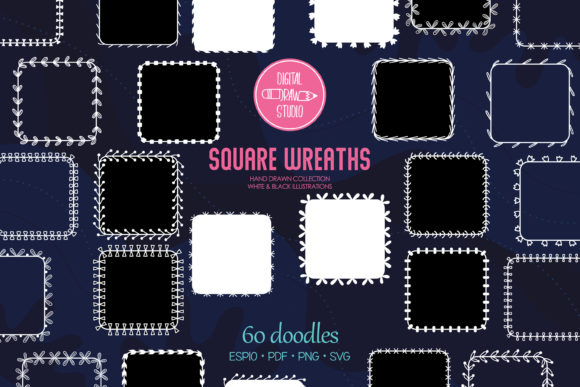
The appeal of Square Wreaths Floral Borders, Frames lies in their adaptability. While traditional circular wreaths frame content naturally, square frames create a sense of stability and order. They are ideal for monogram illustrations where the letters need a strong geometric anchor, or for creating borders on wedding invitations that align neatly with the page margins. Whether you are a small business owner designing a logo, a blogger creating pin-worthy graphics, or a hobbyist making custom stickers, these designs provide a cohesive look that elevates your visual communication.
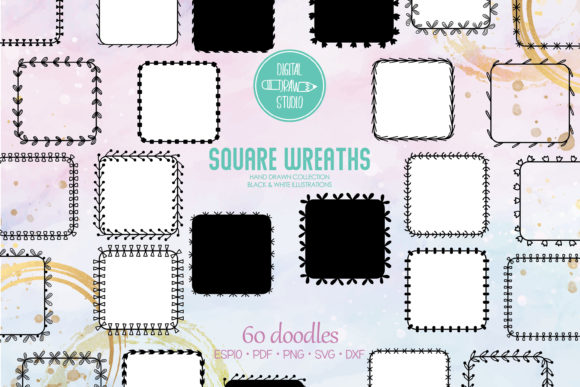
One of the most significant advantages of this specific bundle is the variety of styles offered within the same theme. You aren't just getting one version of a flower box; you receive:
- 20 Black Outline versions: Perfect for coloring pages, adult activity books, or projects where you plan to add your own vibrant hues using software like Procreate or Photoshop.
- 20 Black Silhouette versions: These are essential for cutting machines (Cricut, Silhouette) when you want a solid shape for vinyl decals, stencils, or laser engraving.
- 20 Black and White available options: Great for high-contrast printing or for users who prefer a classic, ink-based aesthetic.
By having all three variations in one package, you ensure consistency across different mediums. For instance, you can use the outline version for a website header and the silhouette version for a matching physical sticker pack, maintaining brand integrity without hunting for matching assets elsewhere.
Common Pitfalls When Choosing Digital Clipart Bundles
Before you finalize your purchase or start your project, there are several technical details that often trip up even experienced designers. The biggest mistake is assuming that all "SVG" files are created equal. In the crafting community, a poorly drawn SVG can lead to hours of frustration as your machine tries to cut paths that don't close or layers that are too complex.
Mistake #1: Ignoring File Format Compatibility
Not every design tool handles every file type correctly. If you are using a basic photo editor, an EPS or DXF file might be useless to you. Conversely, if you rely on vector software like Adobe Illustrator, PNG files will force you to trace images manually, which is time-consuming and rarely results in a clean line. This bundle solves that by offering a comprehensive mix:
- 48 PNG files: High-resolution (300 dpi) with transparent backgrounds. These are ready for print-on-demand services or quick social media posts.
- 48 SVG files: Scalable Vector Graphics that allow you to resize without losing quality. This is non-negotiable for large-format prints or detailed die-cutting.
- 32 DXF files: Specifically formatted for drawing interchange, ensuring compatibility with popular cutting software.
- 3 EPS and 3 PDF files: Editable formats for professional graphic designers who need to manipulate individual elements within Illustrator.
If you buy a bundle that lacks the DXF or EPS files, you may find yourself unable to use the product with your specific workflow. Always check the file list before buying.
Mistake #2: Overlooking the Index Files
A disorganized folder structure is a silent productivity killer. Imagine opening a zip file containing 156 individual image files and having to guess which one is the laurel monogram versus the simple border. This bundle includes INDEX files, which act as a roadmap to your assets. Without these, finding a specific element during a tight deadline becomes a nightmare, leading to missed opportunities or lower-quality work due to rushed selection.
Maximizing Your DIY Projects with Smart Usage
Once you have secured the right files, the next step is applying them correctly. A common error is stretching a raster image (like a low-res PNG) to fit a large banner. Because Square Wreaths Floral Borders, Frames are available in vector formats, you should always default to using the SVG or EPS versions for any project larger than a standard business card. Scaling a vector ensures the edges remain crisp, whether you are printing a wall art piece or creating a decal for a laptop.
For those using die-cut machines, the distinction between the outline and silhouette files is critical. If you attempt to cut a black silhouette file with a machine set to "cut lines," you might get unexpected results depending on the software settings. It is best practice to separate your layers in your design software before sending them to the cutter. Use the silhouette for the base layer and the outline for intricate details if you are doing multi-layer cuts.
Another area where creators struggle is licensing and usage expectations. Since this is a digital listing, no physical item will ever be shipped. Some buyers mistakenly expect to receive a printed sheet of paper or a physical die. Be clear in your mind that you are purchasing the intellectual property to use in your commercial or personal projects. Whether you are creating unlimited stickers for your Etsy shop, designing invitations for a client, or making a unique gift for a friend, the files provided are yours to use according to the license terms.
Final Checklist Before You Start
To ensure your experience with Square Wreaths Floral Borders, Frames is seamless, take a moment to verify the following:
- Check your software: Ensure you have the necessary tools open (Illustrator, Cricut Design Space, Canva, etc.) before unzipping the files.
- Verify resolution: For print projects, confirm you are using the 300 dpi PNGs or the scalable SVGs, not a compressed web version.
- Review the contents: Open the index file first to see exactly what you have received. Confirm the presence of the 48 PNGs, 48 SVGs, 32 DXFs, and the editable EPS/PDF sets.
- Plan your output: Decide if you need the outline for coloring or the silhouette for cutting, and select the appropriate file type immediately to save time.
By approaching your digital craft supplies with this level of preparation, you avoid the frustration of incompatible files and poor print quality. These decorative borders and hand-drawn drawings are more than just pretty pictures; they are building blocks for professional-grade creations. When you choose a bundle that offers transparency, variety, and high-resolution scalability, you set yourself up for success in every project, from the simplest sticker to the most elaborate wall art installation.